Why the Mini PC Is the Eco-Friendly Choice for 2026

Electricity prices keep climbing, and "sustainability" has moved from a buzzword to a line item on your utility bill. Meanwhile, the average desktop tower idles at 60 to 150 watts and can spike past 600 watts under load — day after day, even when you are only checking email. There is a quieter alternative: the mini PC. Here is why a machine the size of a sandwich is becoming the eco-friendly choice for 2026 — and how it quietly pays for itself. And before you picture a nerdy compromise, know this: you give up almost nothing in everyday performance to get there.
What Is TDP — and Why It's the First Number to Check
If you have shopped for a computer, you have seen "TDP" on the spec sheet — but it is one of the most misunderstood numbers in tech. TDP stands for thermal design power, and it is a cooling budget, not a power reading. It tells the heatsink designer how much heat to handle at full load; it does not tell you what the machine actually draws from the wall.
Here is the twist that matters for your bill: a PC spends most of its life idle. The number that shows up on your electricity meter is idle wattage — how much power the system pulls while sitting at the desktop doing nothing. A low TDP usually correlates with a low idle draw, which is why mini PCs, built around laptop-class chips, use so little power. Think of TDP as a car's redline rather than its fuel gauge: two very different engines can cruise at the same speed, but one burns far more fuel doing it.
The Real Numbers: Mini PC vs Desktop Power Draw
Wall-outlet measurements tell the real story. An entry-level mini PC can idle at around 6 watts, and even a capable mid-range mini PC idles at roughly 8 to 15 watts. A traditional desktop tower, by contrast, often idles at 60 to 150 watts — and a gaming desktop under load can pull 300 to 600 watts.
|
System |
Idle draw |
Under load |
|
Entry-level mini PC |
~6 W |
15–25 W |
|
Mid-range mini PC |
~8–15 W |
55–95 W |
|
Traditional desktop tower |
60–150 W |
200–400 W |
|
Gaming desktop |
50–100 W |
300–600 W |
These are wall-outlet readings, not manufacturer estimates, so they include the power supply's own losses. Exact figures shift with RAM, storage, attached devices, and BIOS settings, but the order of magnitude holds across the board.
The gap is not subtle. For everyday tasks — web browsing, documents, email, video calls — a mini PC and a desktop deliver a near-identical experience, yet one draws up to ten times the power.
What That Means for Your Power Bill
The arithmetic is simple and encouraging. One watt running around the clock is about 8.76 kilowatt-hours a year. At a typical US rate of $0.17 per kWh, that works out to roughly $1.49 per watt per year.
|
Average draw |
Annual kWh (24/7) |
Annual cost @ $0.17/kWh |
|
8 W |
~70 |
~$12 |
|
15 W |
~131 |
~$22 |
|
75 W |
~657 |
~$112 |
|
125 W |
~1,095 |
~$186 |
A desktop idling at 100 watts costs around $149 a year just sitting there; a mini PC at 10 watts costs about $15. That $130-plus gap compounds over the three-to-five-year life of a machine — and for a home office that runs eight hours a day, the savings can pay for the mini PC itself within a couple of years. Put another way: if a mini PC saves you $100 a year and costs $200, the simple payback is two years — and it keeps saving after that.
Beyond the Bill — The Carbon-Footprint Case
The economic case is only half the story. Electricity still carries a carbon cost, and lower watts mean a lighter footprint — roughly, every kilowatt-hour you do not use is carbon you do not emit. A desktop that burns 100 watts more than a mini PC, running eight hours a day, wastes nearly 300 kWh a year. Multiply that across an office, a team, or a city of home workers, and the difference becomes real — a meaningful share of what a single rooftop solar panel produces in a year.
There is a quieter kind of sustainability here too. Fewer watts mean less heat, which means less air-conditioning load in summer. A smaller physical footprint means less material, less packaging, and less shipping weight. And a machine that can run on battery pairs naturally with solar or off-grid power — a meaningful detail for anyone tracking their footprint.
Silent, Small — the Benefits You Can Feel
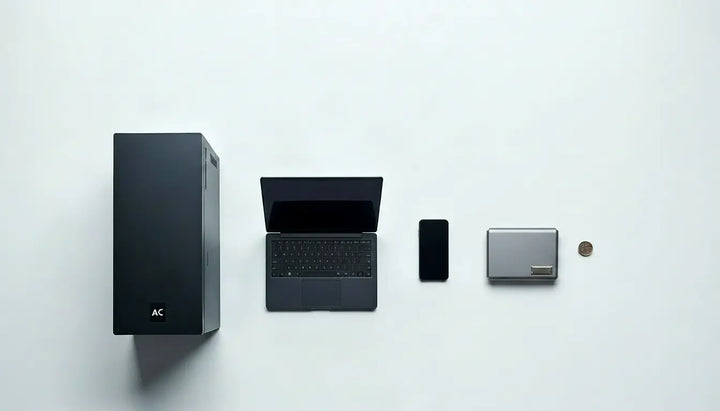
The energy savings come with side effects you will actually notice. Lower power draw means less heat, which means smaller — or no — fans, so a mini PC can be effectively silent even under load. And the size: a mini PC fits behind a monitor, in a drawer, or in a bag, freeing your desk from the tower. For a home office or a small apartment, that is less clutter, less noise, and less heat dumped into the room. You get a quieter, cooler desk without touching your workflow — the same apps, the same browser, the same files.
Take the Starole FoldPC as an Example
The Starole FoldPC shows how far the "green PC" idea can go. It runs a mobile-class AMD Ryzen 7 8840U processor — the kind built for thin-and-light laptops, with a 15–30W thermal design rather than the 65–125W+ of a desktop chip — so it delivers full desktop productivity at a fraction of the power draw. Folded into a keyboard with a trackpad and a 60Wh battery, it also replaces three or four separate devices (tower, keyboard, mouse, power bank) with one — and fewer devices to make, ship, and eventually recycle is sustainability too. Because it runs on battery, it slots naturally into solar or off-grid setups. It is the same green logic taken to its end: one small, efficient device doing the work of several larger ones. In other words, it is a mini PC with its own built-in powerbank — no wall outlet required.
FAQ
How much electricity does a mini PC use?
Most mini PCs draw about 6 to 30 watts depending on the model and workload, versus 60 to 150+ watts for a typical desktop tower at idle. Measure at the wall for an exact figure.
Is a mini PC cheaper to run than a desktop?
Yes — especially for a machine that is on most of the day. A 100W desktop can cost around $149 a year to idle, while a 10W mini PC costs roughly $15, a difference that adds up fast.
What is TDP, and should I care?
TDP (thermal design power) is a cooling budget, not actual power draw. What matters for your bill is idle wattage. Low-TDP mini PCs almost always idle far lower than desktop towers.
Does a mini PC run hot or loud?
Lower power draw means less heat, so many mini PCs are effectively silent. That is one reason they suit bedrooms, offices, and shared spaces.
Should I replace my desktop with a mini PC to save energy?
If your desktop runs most of the day for everyday work and web tasks, yes — the power savings alone can pay for a mini PC in a couple of years. Keep the desktop only if you need heavy GPU work or many internal drives.
How do I measure my PC's actual power draw?
Plug your PC into a cheap wall-outlet power meter (or an energy-monitoring smart plug), let it settle for ten minutes, and read the watts. Compare that to the figures above to see exactly what you could save.
Can a mini PC run on a powerbank?
Most mini PCs need a wall outlet, and only a few can run off an external USB-C power bank with the right power-delivery rating. A mini PC with a built-in battery — like a foldable keyboard PC with a 60Wh pack — sidesteps this entirely and runs on its own power, no outlet required.
Is a higher TDP better?
Not necessarily. Higher TDP means the chip can draw more power to sustain performance under load, but it also means more heat, more fan noise, and a bigger electric bill. For everyday work, a 15–30W TDP — typical of mini PCs — is plenty, while desktops at 65–125W+ burn far more power for the same tasks.
What is the lowest power consumption mini PC?
Entry-level mini PCs built on low-power laptop-class chips can idle around 6 watts. The better spec to check is idle wattage rather than TDP — a low-TDP chip that idles high can still cost more than you expect.