For decades, "getting a real computer" meant a big box on or under your desk. That picture is changing — and it's worth paying attention, because a few shifts underway right now will shape what a computer looks like a few years from now. This isn't about predicting a revolution; it's about three concrete directions worth watching: AI moving onto the device, form factors that fold and shrink, and screens becoming optional.
Are Desktops Being Phased Out?
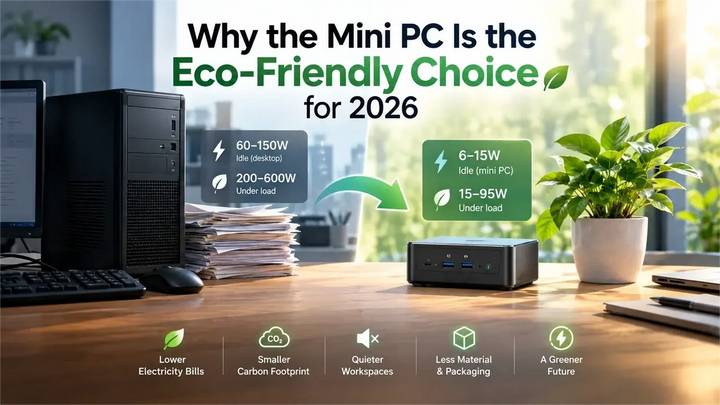
The traditional desktop tower has been losing ground for years. What once required a full-size chassis now fits in a box you can hold in one hand, and the reasons go beyond smaller chips. Remote work, co-working spaces, and the simple habit of moving between desks have shifted the question many buyers ask — from "how powerful is it?" to "where can I take it?"
But "phased out" overstates it. Desktops aren't disappearing overnight. For heavy gaming, video editing, and other workloads that demand maximum cooling and upgradeability, a full-size build still makes sense. What's really happening is a split: the tower is retreating to the high end, while the everyday middle — documents, browsing, coding, streaming — is increasingly well served by compact machines.
Can a Mini PC Really Replace a Desktop?
For most people, the honest answer is yes — with a few caveats. Modern compact PCs use the same desktop-class processors as their larger counterparts, just in a smaller body. For everyday work and study, the experience is close to indistinguishable.
The difference shows up at the edges. A compact PC typically can't match a tower's discrete graphics card, and upgrade options are more limited. Here's how they compare:
|
|
Full-size tower |
Compact PC |
|
Desk footprint |
Large, fixed |
Small, portable |
|
Performance ceiling |
Highest (discrete GPU, upgradeable) |
High (desktop-class chips, limited upgrades) |
|
Best for |
Heavy gaming, rendering, max upgradability |
Everyday work, remote setups, portability |
So the real question isn't "can it replace a desktop?" — it's "what kind of desktop do you actually need?"
What Is the Downside of a Mini PC?
No form factor is perfect, and compact PCs make real trade-offs. It's worth knowing them before you buy.
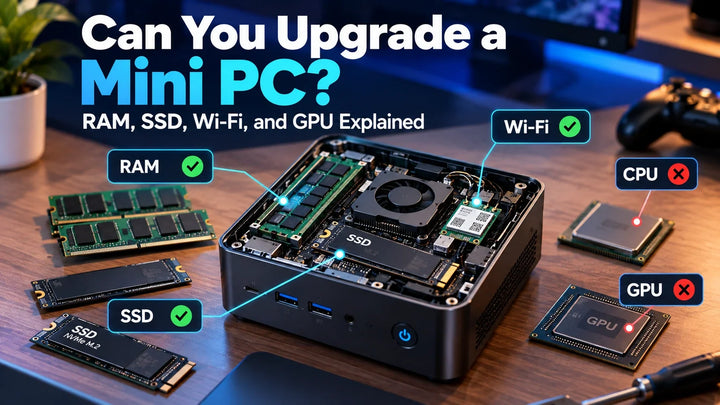
The main downsides are upgradeability, thermals, and performance headroom. Because everything is packed into a small chassis, you usually can't swap out the graphics card or add much beyond storage and sometimes memory. Cooling is constrained too, which can limit sustained performance under heavy load.
|
Downside |
What it means |
Who should care |
|
Limited upgrades |
GPU rarely replaceable |
Gamers, upgraders |
|
Constrained cooling |
Sustained heavy load may throttle |
Video editors, heavy compute |
|
Performance ceiling |
No high-end discrete GPU option |
AAA gaming, 3D rendering |
If your work lives mostly in a browser, office apps, and code, none of these will bother you. If you're pushing a discrete GPU to its limit daily, a compact PC probably isn't your primary machine.
AI Is Moving Onto the Device
The biggest shift in compact computing isn't about size — it's about what the device can do on its own. For the past few years, most AI features lived in the cloud: you sent your data to a server, waited for an answer, and often paid a subscription.
That's changing. A new generation of processors ships with a dedicated neural processing unit (NPU) built in — silicon designed to run AI models locally. This is what the industry calls an "AI PC," and it's becoming the default rather than the exception. The difference is easiest to see side by side:
|
|
Cloud AI |
On-device AI |
|
Requires internet |
Yes |
No |
|
Data location |
Uploaded to a server |
Stays on the device |
|
Ongoing cost |
Often a subscription |
None after purchase |
|
Model size |
Can run huge models |
Limited to what hardware supports |
For anyone handling sensitive work, that privacy difference is the point — not a bonus.
The Form Factor Keeps Evolving
Compact computing used to mean one thing: a small box you plugged into a monitor, keyboard, and mouse. That's still the most common shape, but it's no longer the only one.
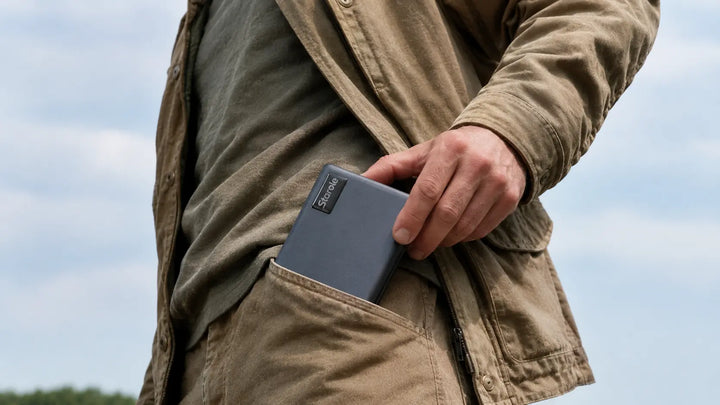
The next wave is about integration — folding more of the computer into a single device so you don't need to carry three peripherals. Take the Starole FoldPC as an example: it's a full PC built into a foldable keyboard, with a trackpad and a 60Wh battery already inside. You unfold it, connect it to a screen you already own, and you have a complete workstation that weighs less than a typical tablet.
That's the direction worth watching: fewer separate pieces, more built in, and a device that travels as easily as it sits on a desk.
Screens Are Becoming Optional
For years, a laptop's built-in display was the thing you paid for — and the thing that made it heavy. But if you already have screens everywhere you go (a monitor at the office, a TV in the hotel, a portable display in your bag), that built-in screen becomes dead weight.
That's why a growing category of compact PCs skips the display entirely and lets you use whatever screen is in front of you. It's also why AR glasses keep coming up: a device without a built-in screen is a natural partner for head-worn displays, where your entire desktop becomes private and visible only to you.
Screen-free computing is still niche. But for people who already own displays — or who travel constantly — it's an option worth considering.
FAQ
Q: Can a mini PC replace a desktop?
For most everyday work — documents, browsing, coding, streaming — yes. Modern compact PCs use the same desktop-class processors as towers, just in a smaller body. The main gaps are graphics power and upgradeability, which matter mainly for heavy gaming and rendering.
Q: What is the downside of a mini PC?
The main downsides are limited upgrades, constrained cooling, and a lower performance ceiling. You usually can't swap the graphics card, and sustained heavy workloads can run hot. For everyday use, these rarely matter.
Q: How long do mini PCs usually last?
A well-built mini PC typically lasts five to seven years or more, similar to a desktop. Because components are harder to upgrade, longevity depends more on choosing enough memory and storage up front.
Q: What is on-device AI?
On-device AI means running AI models directly on your computer's own hardware — usually a dedicated NPU — rather than sending your data to the cloud. It's faster, works offline, and keeps your data private.